
112 lines
4.2 KiB
Markdown
112 lines
4.2 KiB
Markdown
## 项目介绍
|
|
- 这是一个基于uni-app vue3 cli的模板项目,主要是集成了常用的css原子化,eslint的代码规则,配置了husky的提交校验,
|
|
- uview-plus UI框架,并且对于小程序进行了常用的界面的封装,ios下的安全区域,滚动条等都已经配置好,只需要关心业务内容即可
|
|
- 支持换肤功能,非常的干净简洁,没有过多的内容
|
|
|
|
## 项目启动
|
|
* 安装
|
|
```html
|
|
npm install
|
|
```
|
|
* 初始化git husky的校验,git commit内容的规则可查看commitlint.config.js文件
|
|
```html
|
|
npx husky-init
|
|
<!-- 初始化之后,需要手动修改.husky/pre-commit 把run test删除-->
|
|
```
|
|
* 启动开发环境H5
|
|
```html
|
|
pnpm run dev:h5
|
|
```
|
|
* 运行到小程序
|
|
```html
|
|
pnpm run dev:mp-weixin
|
|
```
|
|
* 构建发布小程序
|
|
```html
|
|
pnpm run build:mp-weixin-develop
|
|
后面的develop只是区别不同的环境,test环境就使用test即可,具体可看package.json
|
|
```
|
|
|
|
## 项目结构
|
|
- api 封装了http请求,在其子目录modules下放具体的api请求
|
|
- components uni-app自带的easycom目录,以目录名称-文件名称这两者相同,可以直接在界面当中该组件,不需要引用
|
|
- pages 界面文件
|
|
- hooks 存在自定义的hooks文件
|
|
- static 静态文件,因为是小程序项目,图片尽量全部都放在云端,减少体积
|
|
- store pinia全局管理的存放文件
|
|
- utils 工具类,工具函数存放
|
|
- styles 全局的样式文件
|
|
- themes 主题文件,在设置之后需要再App.vue的style标签中引用才可以生效
|
|
|
|
## 插件介绍与使用
|
|
- uni-ui uni-app官方的多端UI框架,是easycom的自动引用方式,直接在界面中使用即可,无需引用,ui文档 https://uniapp.dcloud.net.cn/component/uniui/uni-ui.html
|
|
- uview-plus的支持vue3的UI框架,文档 https://uview-plus.jiangruyi.com/
|
|
- z-paging 滚动加载插件,非常好用
|
|
- unocss 原子化css插件
|
|
- pinia-plugin-unistorage 支持多端的pinia持久化储存插件,在pinia定义store的时候,加上 unistorage: true即可
|
|
```html
|
|
import { defineStore } from 'pinia'
|
|
export const useUserStore = defineStore({
|
|
id: 'user',
|
|
state: () => {
|
|
return {
|
|
}
|
|
},
|
|
unistorage: true, // 加上这一行,就可以实现state中的值持久化存储
|
|
getters: {},
|
|
actions: {}
|
|
})
|
|
|
|
```
|
|
|
|
## 开发界面事项
|
|
- 常规界面都使用下面的示例
|
|
- custom-page 高度都是100%,默认的情况会padding-top手机状态栏的高度,更多用法请查看custom-page组件
|
|
- custom-head 顶部的导航栏,默认的情况下跟小程序的自带的右侧药丸一样的高度
|
|
- scroll-page 滚动区域,默认情况下会继承外部的高度,并且内容超过该高度的话,会自动滚动,并且去掉了默认的滚动条
|
|
```html
|
|
<template>
|
|
<custom-page>
|
|
<custom-head title-text="演示界面"></custom-head>
|
|
<!-- 使用scroll-page 组件的话,需要加上content-container才能让里面的元素继承外部的高度-->
|
|
<scroll-page class="content-container">
|
|
<!-- scroll-page 是flex布局,会自动获取界面剩余的全部高度,并且内容超过该高度的话,会自动滚动-->
|
|
<div class="h-[3000rpx]">我是滚动的区域</div>
|
|
</scroll-page>
|
|
<view class="bg-red-500 h-[200rpx]">123</view>
|
|
</custom-page>
|
|
</template>
|
|
<script setup></script>
|
|
|
|
<style lang="scss"></style>
|
|
|
|
|
|
```
|
|
- 主题换肤功能
|
|
- 在styles/themes文件下可添加你的主题scss文件,建议文件名与最终主题名相同,然后在App.vue的style中引用你的scss文件,类似下面,default-theme就是你主题的名称,通过修改store/system中的commonThemeName字段为你的主题名称,使用了custom-page作为根节点的界面,都会进行对应的主题更改
|
|
```html
|
|
//主题scss
|
|
.default-theme {
|
|
@import 'styles/themes/default-theme.scss';
|
|
}
|
|
```
|
|
|
|
```html
|
|
<script setup>
|
|
import useSystemStore from '@/store/system.js'
|
|
const systemStore = useSystemStore()
|
|
// 换肤
|
|
systemStore.setThemeName('blue')
|
|
</script>
|
|
```
|
|
|
|
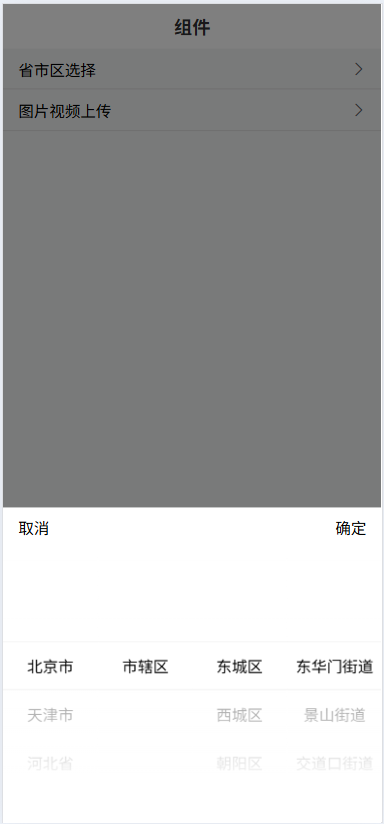
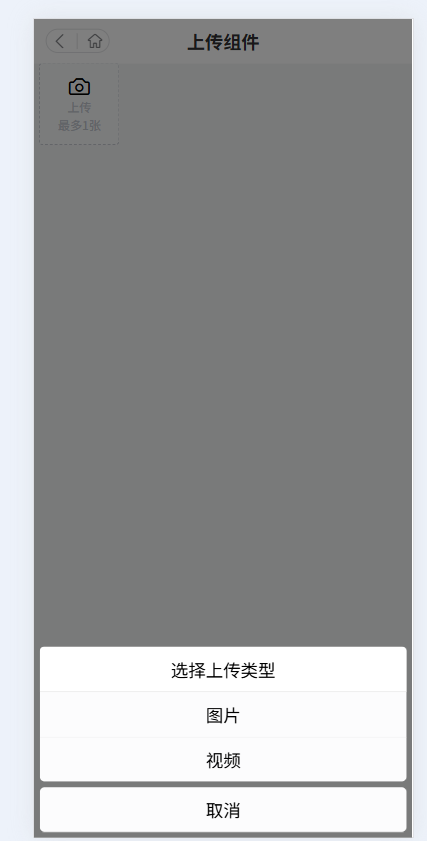
## 封装两个很常用的组件,可以直接下载项目运行查看
|
|
- 省市区选择
|
|
|
|
|
|
|
|
- 上传图片与视频
|
|
|
|
|
|
|